100% US-based support. Real technicians, on call 24/7 for emergencies.
System status
Unified Communications
A hosted call center built into your phone system. Basic queues calls, Pro adds True Messaging and caller context, Enterprise adds mass alerts.
Book a Short DemoAt a glance
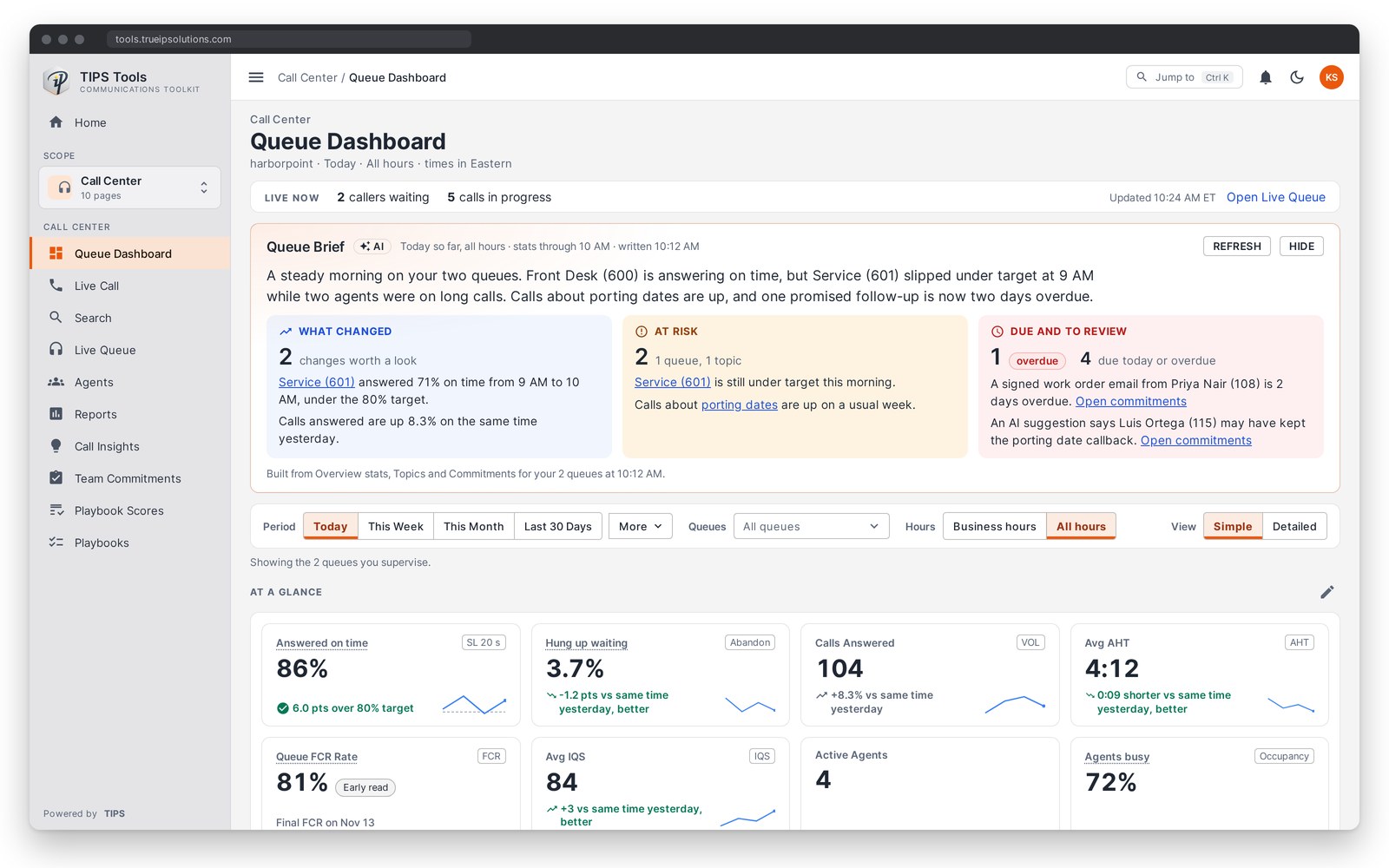
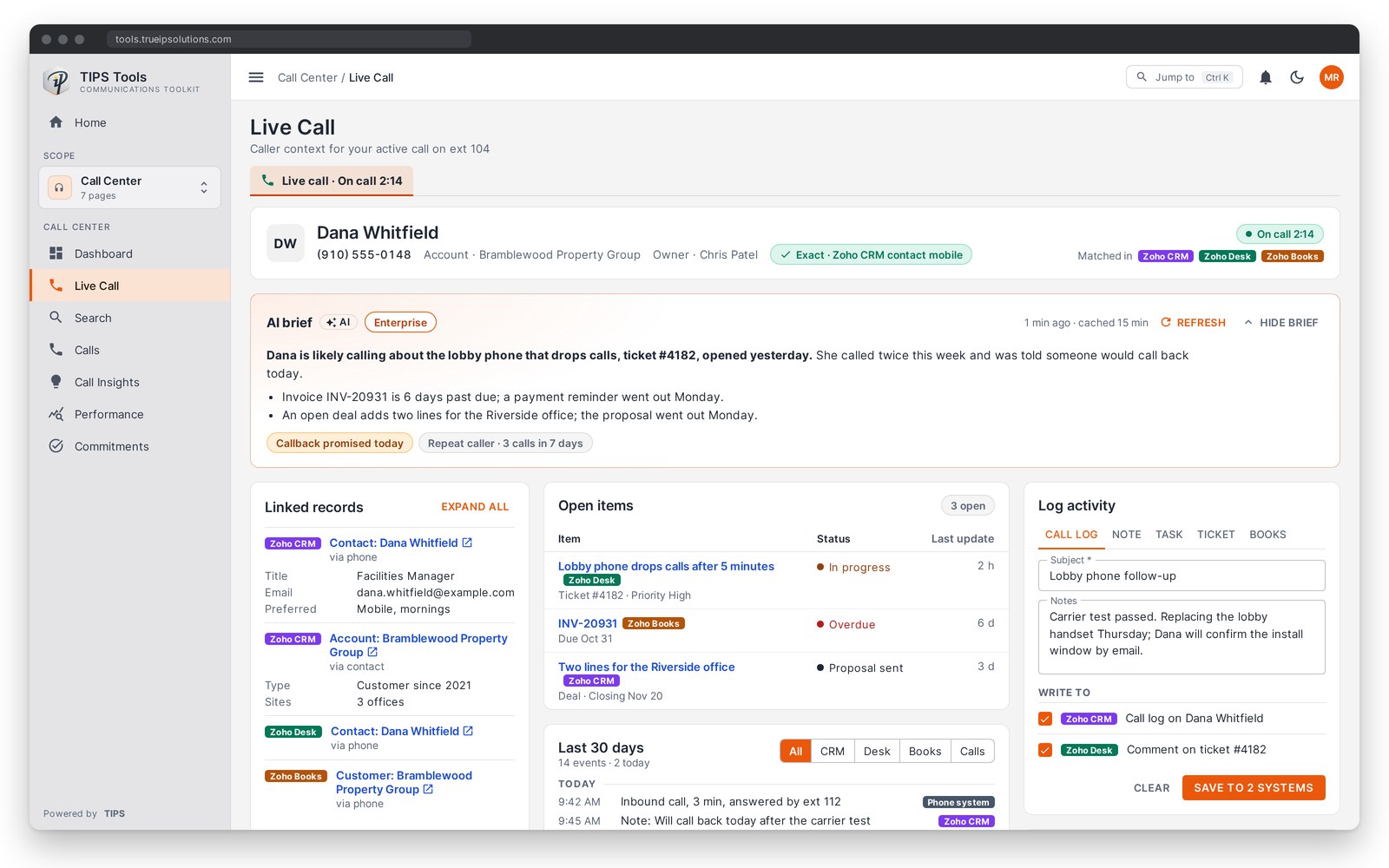
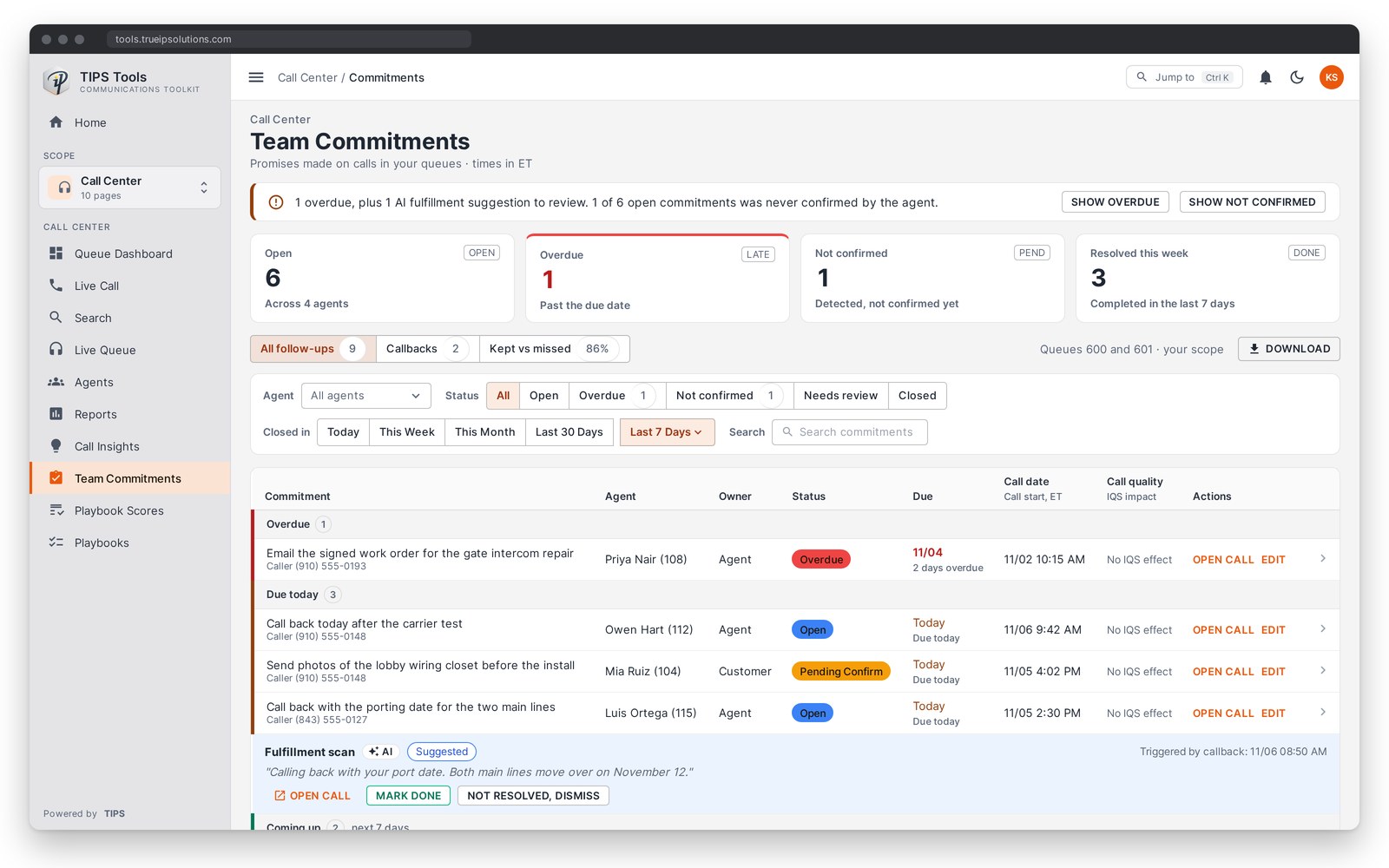
One hosted phone system and one support team, with a call center in three levels. Basic queues calls and reports on them, and standard texting can be added to any phone system number. Pro adds consent-tracked texting with True Messaging, TIPS Context and detailed analytics. Enterprise adds mass notification and AI that briefs staff, coaches agents through each call and catches promises made on calls.
Select a level to see what it adds in the table below.
| Feature | Basic | Pro | Enterprise |
|---|---|---|---|
| Call center | |||
| Call queues and automatic call distribution | Yes | Yes | Yes |
| Agent login and logout, with wrap-up codes | Yes | Yes | Yes |
| Supervisor listen, whisper and barge | Yes | Yes | Yes |
| Live Queue board with every queue and active call in real time | Yes | Yes | Yes |
| Call recording, first 30 days kept | Yes | Yes | Yes |
| Topic frequency and watched topics | No | Yes | Yes |
| Sentiment analysis after the call, basic | No | Yes | Yes |
| Live Transcription per queue, billed per minute | No | No | Yes |
| Live Queue tension and caller sentiment, with supervisor alerts in real time | No | No | Yes |
| Post-call survey | Add-on | Add-on | Yes |
| My Commitments: AI catches promises made on a call and flags them when they run overdue | No | No | Yes |
| Team Commitments: every open promise across your agents and queues, with kept versus missed per agent | No | No | Yes |
| Sentiment search with call playback, and trends per agent | No | No | Yes |
| Recording Moments: jump to holds, transfers, tense stretches and skipped Playbook items | No | No | Yes |
| Call center AI, reports and analytics | |||
| Core reports: volume, service level, wait time, handle time, abandonment | Yes | Yes | Yes |
| Scheduled email reports to anyone, no login needed, with CSV, PDF and Excel exports | Yes | Yes | Yes |
| Detailed analytics: custom report builder, can store up to 7 years of call history | No | Yes | Yes |
| Repeat callers within 7 days | No | Yes | Yes |
| Agent occupancy, transfer rate and escalation rate | No | Yes | Yes |
| Abandonment heatmap by hour and day, performance by dialed number, service level trends | No | Yes | Yes |
| Daily agent performance with hold time | No | Yes | Yes |
| Interaction Quality Score on every call | No | Yes | Yes |
| Ask Trudy: plain-English answers about your call data | No | Yes | Yes |
| AI Supervisor Brief | No | No | Yes |
| AI Agent Assist | No | No | Yes |
| Agent Playbook: your call script as a live checklist, with a QA score after each call | No | No | Yes |
| Team Coaching: gaps from scored calls, with a suggested huddle topic and example calls | No | No | Yes |
| Ask Trudy charts and side-by-side comparisons | No | No | Yes |
| Messaging | |||
| Standard texting on a phone system number, with pictures, conversation history, and STOP and START | Add-on | Yes | Yes |
| True Messaging consent tools: consent tracked per number, block a sender | No | Yes | Yes |
| True Messaging inbox: personal number, contacts, merge duplicates | No | Yes | Yes |
| Share a number with an assistant | No | Yes | Yes |
| Away messages on a personal number and a call queue, with timeframes | No | No | Yes |
| Canned responses and custom stop keywords | No | No | Yes |
| Contact import, with a preferred language per contact | No | No | Yes |
| Distribution lists, group send and scheduled send | No | No | Yes |
| Mass notification by text, voice and email to a list | No | No | Yes |
| Send by text: approved staff start a mass notification from their phone, confirmed with a PIN | No | No | Yes |
| Registration page with consent time and IP recorded, JOIN keyword with custom keywords, opt-out page, and your logo on both pages | No | No | Yes |
| Lists that follow a group in a connected system | No | No | Yes |
| TIPS Context | |||
| Live Call with TIPS Context: caller recognized while the phone rings | No | Yes | Yes |
| Call notes written back to a connected system | No | Yes | Yes |
| Search across your connected systems from one box | No | Yes | Yes |
| Context beside a text in the True Messaging inbox | No | Yes | Yes |
| Caller brief: a short AI summary of the caller's history | No | No | Yes |
| The caller's open commitments on the live call page | No | No | Yes |
Promised callbacks and follow-ups for service calls, sales and support across locations and departments.
Learn more →Repeat callers and promised callbacks for departments that answer about tax bills, permits and county services.
Learn more →Repeat callers and promised callbacks to parents on a busy front office line.
Learn more →Start with Basic if you need calls to reach the right person and a live view of the queue. Standard texting can be added to any number. Move to Pro if you want consent-tracked business texting and detailed analytics. Pro also shows staff who is calling. Choose Enterprise if you need to reach whole groups or show which follow-ups were missed.
Yes. Every level runs on the same hosted phone system, so moving up turns on more of it.
No. Basic is built into the hosted phone system.
Today it connects to Zoho CRM, Desk and Books, Clio, Go High Level and NetSuite. See the integrations page.
No. An account runs on one level, Pro or Enterprise, and you turn it on and pay only for the users who need those features. Tell us which teams answer queues or send alerts and we will set it up for them.
By default, call recordings are kept for 30 days. On Pro and Enterprise, call history, call transcripts and texts can be stored for up to 7 years. AI summaries are not stored long term. Each customer can change these periods to match their records schedule.
No. We quote after a short call, because pricing depends on the level, the users you turn on for it, the texting lines you need and the type of organization.
Book a short demo and we will walk through the level that fits how your office answers the phone.